Showing posts with label Android. Show all posts

Android Web based Market place becomes a reality.

Wednesday, February 23, 2011

Android devices have been steadily taking over the mobile industry one user at a time since its inception into the cell phone market. Looking over the operating systems history you can see many user based issued being addressed and ultimately “fixed” with an update to the operating system. Point here is Google listens and adds the “things” users want and simply do away with what is not used or simply not easy to use. Apples iPhone has taken itself to infinity and beyond with its iTunes based app store. An iPhone user can log onto their desktops from home browse and ultimately download apps right from the homes. Unfortunately however iPhone users do indeed have to sync their phones for installing purposes. Not so bad right? Well take a look at Googles newly launched web based market place and you may reconsider.
Today Google had themselves a little Honeycomb presentation for the world to see. Honeycomb for those unaware is the new version of Androids operating system that has been optimized for tablets. During this presentation the beauty of what Honeycomb is was shown off to a great extent, and boy is it great. But bigger news for the majority of the Android community that is no rocking an Android based tablet is the new web based market place. You can now go to the Android market place directly at market.android.com. This is simply the market place you are used to seeing on your phone set up for you home browser. The idea behind this to an end user is simple. Its way easier to find new apps, share apps and even install them onto your mobile device. The installation process is very streamlined as your newly acquired application can be installed onto your Android device over the air (OTA). You find the app you like, click the install button and viola the app is almost immediately installing on your phone. If you have more than one Android under your Google account, no worries it will be sure to ask you what device you want the app installed on.  No wires or magical cables needed.  All of the content found on your mobile market place is also available within the web based version. User reviews, screen shots permissions etc. Developers of applications can now post video promoting their products. Definitely a plus to someone browsing for apps as well as video can surely tell a better story then a few screen shots.
All in all I’m sure I will be down loading more applications than ever. What about you? Does the larger screen and easier to use functionality mean anything to you when looking for apps? It surely does to me. Android users tell me what you think of the new web based version of the app market.

Dell Streak 7 Offers Solid Tablet Experience, with Android 2.2 Quirks

Tuesday, February 08, 2011

eWeekDell's newest tablet, the Streak 7, is aimed at the increasingly competitive market for 7-inch tablets. Running Android 2.2 

("Froyo"), and backed with a dual-core 1GHz Nvidia Tegra processor, the device will compete directly against the Samsung Galaxy Tab and RIM's upcoming PlayBook, and in the broader tablet category against the bestselling Apple iPad. Dell has suggested that the Streak 7 will receive over-the-air software updates, meaning it could upgrade soon to tablet-centric Android 3.0 ("Honeycomb")—which, being optimized for larger screens, means that users could conceivably get more from their applications. Dell's previous effort, the 5-inch Streak, tried to walk the tightrope between smartphone and tablet. The Streak 7, by contrast, feels like a pure tablet. The screen makes e-reading an eyestrain-free experience, and the processor means that heavier-duty functions such as video and games perform without a stutter. That being said, the screen seems a bit dimmer than rival offerings, and certain features—most notably the camera—could use some improvement. But as tablets go, Dell's latest is a solid offering in a category still struggling to define itself. The Streak 7 sells for $199.99 with a two-year T-Mobile contract, or $449.99 unlocked.

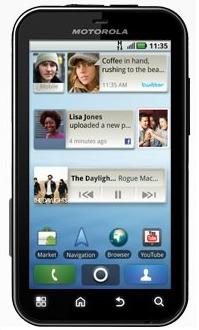
Motorola Mobility, a subsidiary of Motorola, Inc. today announced the launch of slim, pocket-able and “life proof”Android 2.1 (Éclair) based 3G smartphone Motorola DEFYin Indian market for Rs. 18990.

Sunday, January 30, 2011

Motorola Mobility, a subsidiary of Motorola, Inc. today announced the launch of slim, pocket-able and “life proof”Android 2.1 (Éclair) based 3G smartphone Motorola DEFYin Indian market for Rs. 18990.
Motorola DEFY is a slim and pocket-able smartphone that comes equipped with a 3.7” high-resolution, scratch-resistant touch screen display that provides edge-to-edge views of your favorite websites, photos and videos.
The device is scratch and water resistant as well as dust proof, protecting you from life’s little challenges such as spilling liquids, a sudden rain shower or a drop in the sand. DEFY also features CrystalTalk PLUS to vanquish noisy environments.
Motorola DEFY is designed to handle everything that life throws your way. With all the features consumers expect in a smartphone, It is a quad-band GSM phone that will support 3G networks with RF of WCDMA-UMTS 850/1700/2100, GSM 850/900/1800/1900, HSDPA 7.2 Mbps (Category 7/8). The device packs Web browsing, entertainment and messaging capabilities.
An Adobe Flash Lite-enabled Web browser and 3.7-inch WVGA screen allow you to view more of the Web than standard browsers. Enjoy the same access to Google services as available on FLIPOUT including Google Search, Google Maps and Gmail.
With a durable form-factor and 5 megapixel camera featuring a flash, digital zoom and auto focus, the Motorola DEFY is the trusty companion to capture memories at the next family reunion or vacation.
DEFY is Digital Living Network Alliance (DLNA)-enabled to stream, store and share content with compatible devices around the home like HDTVs, game consoles and PCs. Also, the Connected Music Player provides the option to display lyrics to your songs and enables you to discover, buy and download music, right from your phone.

Android - What’s the fuss all about?

Tuesday, January 25, 2011
If one speaks of convergence of technology, there is no better example to give than that of the poor old cell phone. The original phone was hardly any different than the existing landlines. One difference I can point out (other than the lack of wires) is the concept of offline dialing. Later they were given alphabetical keyboard for texting, then cameras, and the story continued.

No one ever bothered about the hardware capabilities of their devices or the operating systems they are on. Most Nokia users haven't even heard of Symbian, the operating system their phones run on. The OS never got any attention because it was nothing more than a software that made the phone work.

Let's see what the Android fuss is all about. Well firstly it's by Google, so like all its creations such as Gmail, Gdocs, Gmaps, Gtranslate, Gtalk, GEarth, Streetview, Youtube (consciously ignoring Orkut); it's bound to be breathtaking. Secondly (this is a big one), you get all the goodies mentioned above as default on the android system.

Decoding the apps:
Google Maps lets you navigate with street by street voice instructions. An equivalent MapMyIndia GPS device would set you back by Rs7000. Cheapest Android costs Rs9000. The streetview feature lets you view street level 360 degree panorama of practically every city in the world.

It has got the good old Gmail on your cell phone. Well what so new? Gmail Android integrates your push email, so you don't need your crackberry devices anymore. Also it lets you sync multiple accounts and supports all kinds of attachments.

All your phone book contacts are synced with your Google account and your Google contacts are brought to your phone. The cherry on the cake is that if you specify a Facebook account, it can get all the information that your friends have posted including birthdays, phone numbers, display picture etc. for the Caller ID.

The Google Goggle is a new service provides users with the functionality to Google search by clicking picture of the things they want information about, like a famous painting or a monument or even a book. It also incorporates advanced OCR technology to read visiting cards and then search Google businesses for
information.

Google Earth is a virtual globe, map and geographical information program. It displays satellite images of varying resolution of the Earth's surface, allowing users to see things like cities and houses looking perpendicularly down or at an oblique angle. Talk about carrying the world in your pocket.

If you've heard of Apple boasting about 30,000+ applications in its iStore, Android Market is the Google equivalent of it. It lets you download certified applications either for a nominal rate or mostly for free. This really displays the spirit of a market as developers post their applications in a unified location where users can browse through.

The coolest application I have come across here is the one that connects to GPS and tells you what speed you are driving at. It even warns you if you are speeding. There are millions of applications to choose from, yet if none meet your needs why not create one yourself? You might just end up making a little money in the process.

PAC-MAN by Namco Networks Free for Android

Wednesday, January 19, 2011

PAC-MAN, the world famous arcade classic, returns in this faithful rendition for Google Android devices and for a limited time, T-Mobile G1 users play for free ($9.99 value). Chomp the dots, avoid the pesky ghosts and relive the retro arcade action! This PAC-MAN may require an update to the latest firmware.

10 Reasons Android 2.2 Will be Superior than Apple iOS 4

Friday, January 14, 2011
Design Improvements
Android 2.2 is getting a slight face-lift and is catching up with the design of iOS 4, which brings Apple lots of pressure.

Speed and Performance
Android 2.2 will deliver far better performance and improved speed in its native apps. Now, Apple could lose this advantage.

Flash Support
Google will allow its users to access majority of video and games on the Web which they can't view on iOS 4 devices, and Adobe Flash to Android OS 2.2 is a major upgrade for Google's mobile platform.

WiFi Hot Spot
Motorola has introduced the Droid X, and users would be able to access the WiFi hot spot owing to the support in Android 2.2. Users will be able to share a 3G Web connection with up to five different people at Starbucks or in a professional setting.

A Better Browser
Google has adopted an improved browser in Android 2.2 to help users surf the Web more effectively. Some users claim the mobile Chrome browser of Android 2.2 is faster than mobile Safari on Apple's iPhone.

Better Exchange Support
Android 2.2 will have exchange-related features such as calendar synchronization, auto-discovery, and remote wipe.

Major Phones Support
At first, Android 2.2 is available to Google Nexus One users, and it will debut on all HTC Droid Incredible and the Motorola Droid X over the next few months.

Improved Android Market
With Android Market, users can make batch upgrades to their apps, and install apps on removable media such as SD cards. Besides, Google has also added several APIs to the developer SDK.(Android NDK recommended)

Vendors Expectation
Google's latest Android 2.2 is the best competitor to Apple iOS 4, and Dell has jumped in the new mobile OS. Meanwhile, many vendors are looking forward to more Android-based devices over the next year.

Enterprise Solution
Google Android 2.2 is ready for enterprise use and Android OS is more enterprise-friendly than ever.

Top 8 features of Android 2.3

Top 8 features of Android 2.3


1. Tweaked UI

Android UI is getting a complete overhaul till Honeycomb, but Gingerbread will include some small tweaks. 

2. NFC
NFC is a short-range of Near Field Communications, high frequency wireless communication technology that only operates when two devices are about 4 inches apart. It is basically just another form of electronic identification except the ID is tied to a bank or credit card company. 

3. New Motion Control APIs
Android 2.3 will add new sensor fusion APIs including quaternion, rotation matrix, linear acceleration and gravity.

4. Native Video Chat
It looks like all the high-end phones coming in the next few months will include front-facing cameras so this is another sign that Android is ready for a native video sharing app to connect all these devices.

5. Google Music
Google Music for Android 2.3
Google is also working on a music streaming service for Android. Apparently the music labels are still negotiating with Google on how their "digital locker" will store purchased Google music, but maybe they come to an agreement this year.

6. Support for WebM and VP8
We know that support for WebM and the VP8 video format are coming to Gingerbread because Google and the WebM team have told us this.

7. Google Me or Social Gaming Network
Google Me for Android 2.3
Google recently denied the reports they were working on a Facebook competitor called Google Me, but all the signs are there that Google is working on a way to bring together all their social services. 

8. Flagship Phone - Nexus S
Finally, what good is a brand new operating system unless you have a flagship product that can show off all the new features. That device is the Samsung Nexus S which is widely expected to be released alongside Android 2.3.

Google Introduces Nexus S with Gingerbread

Friday, December 31, 2010
The very first Android phone hit the market in November 2008. Just over two years later, Android’s vision of openness has spurred the development of more than 100 different Android devices. Today, more than 200,000 Android devices are activated daily worldwide. The volume and variety of Android devices continues to surpass our wildest expectations—but we’re not slowing down.


Today, we’re pleased to introduce the latest version of the Android platform, Gingerbread, and unveil the next Android device from the Nexus line of mobile products—Nexus S. And for developers, the Gingerbread SDK/NDK is now available as well.


Nexus S is the lead device for the Gingerbread/Android 2.3 release; it’s the first Android device to ship with the new version of the Android platform. We co-developed this product with Samsung—ensuring tight integration of hardware and software to highlight the latest advancements of the Android platform. As part of the Nexus brand, Nexus S delivers what we call a “pure Google” experience: unlocked, unfiltered access to the best Google mobile services and the latest and greatest Android releases and updates.


Take a look at our backstory video for more on the vision behind this product and to understand why we think “a thousand heads are better than one”:


Nexus S is the first smartphone to feature a 4” Contour Display designed to fit comfortably in the palm of your hand and along the side of your face. It also features a 1GHz Hummingbird processor, front and rear facing cameras, 16GB of internal memory, and NFC (near field communication) hardware that lets you read information from NFC tags. NFC is a fast, versatile short-range wireless technology that can be embedded in all kinds of everyday objects like movie posters, stickers and t-shirts.


Gingerbread is the fastest version of Android yet, and it delivers a number of improvements, such as user interface refinements, NFC support, a new keyboard and text selection tool, Internet (VoIP/SIP) calling, improved copy/paste functionality and gyroscope sensor support.


Here’s a glimpse of the “magic” of Google on Nexus S:


You can find more Nexus S videos and information at google.com/nexus or follow @GoogleNexus on Twitter for the latest updates. After December 16, Nexus S can be purchased (unlocked or with a T-Mobile service plan) online and in-store from all Best Buy and Best Buy Mobile stores in the U.S. and after December 20 at Carphone Warehouse and Best Buy retailers in the U.K.


We’ll be open-sourcing Gingerbread in the coming weeks and look forward to new contributions from the Android ecosystem in the months ahead.

Opera releases WAC-ready widget runtime for Android

Opera Software introduced its new widget runtime platform for Google's Android operating system. The runtime will support the new Wholesale Applications Community (WAC) 1.0 Specification.


WAC is an alliance of the world's leading mobile operators and OEMs, such as Vodafone, Verizon, China Mobile, Telenor, Telefonica, AT&T, Samsung, Huawei and others, working together to define, create and deploy a common mobile application platform. Uniting a fragmented applications marketplace, WAC will create an open industry platform that benefits the entire ecosystem, including applications developers, handset manufacturers, OS owners, network operators and end users.


This alpha release of Opera's widget runtime for Android allows developers to get a head start in developing the next step in applications for smartphones. At the same time, the WAC implementation serves as a platform for distribution.


"It is a great pleasure for us to present our public implementation of the WAC 1.0 specification and to get developers going," said Christen Krogh, Chief Developer Officer, Opera Software. "Opera is participating in WAC and remains committed to take the WAC platform to the masses."


With the Widget runtime for Android, Opera enters a natural arena for its popular widget system. Currently, Opera has implemented cross-device widgets on the Opera desktop browser, Opera Mobile and Opera for devices.


"We are delighted that Opera is supporting WAC 1.0 with its new widget runtime" commented Peters Suh, CEO, WAC, "In the year since WAC was announced at Mobile World Congress in 2010 we have consistently hit our deadlines, and this announcement underlines that we are on schedule to launch WAC 1.0 devices and storefronts at Mobile World Congress 2011."


To start developing widgets and begin implementing the WAC APIs, simply go to http://www.opera.com/download/get.pl?sub=++++&id=33389&location=270¬hanks=yes and download the runtime.


Instructions can be found at: http://labs.opera.com/docs/wac/installation_instructions/ This runtime is provided for evaluation and demo purposes and is free of charge for all developers.

4 Android tablets vie for your attention first to challenge the iPad

Thursday, December 23, 2010

Tablets from Archos, Samsung and ViewSonic are among the first to challenge the iPad

After nearly a year of having the market pretty much to itself, Apple's iPad finally has some serious competition. The first Android-based tablets are starting to ship, and they will soon be followed by a wide variety of portable devices, some of which should give the iPad a run for its money.

To see how the first Android slates stack up against each other, I looked at four tablets: three with 7-in. screens -- the Archos 70 Internet Tablet, the Samsung Galaxy Tab and the ViewSonic ViewPad 7 -- and the 10-inch Archos 101 Internet Tablet. I also checked out HP's PhotoSmart eStation C510, an inkjet printer with a Zeen wireless Android tablet included.

Over two weeks, I had at least one of them with me for most of the day. I used each to write, read e-books, collect my e-mail and bounce between Web sites. I listened to Internet radio stations, played games and watched videos. I also ran a number of tests on each.

The Androids are coming -- finally
By next year, there could be as many as 15 different Android slates available, according to Anna Hunt, principal analyst at IMS Research. She forecasts sales of 36 million Android tablets by 2015, accounting for roughly 28% of the market. "With a variety of Android slates on the way," she says, "this market will grow and grow. This is just the start."

Hunt points out that the potential weak point of the new Android tablets might be software. At last count, Apple's App Store had 300,000 iPad programs available for download; users had downloaded 35 billion copies as of mid-October.

In contrast, the Android Market for downloading software has just over 100,000 programs available, and 2.3 billion copies were downloaded by the end of October, according to AndroLib, which tracks Android apps.

Once things really start moving, buyers should have more to choose from than just the iPad and Android devices. For example, as this was being written, there were rumors that new Windows-based tablets would be announced at the CES trade show in January, and RIM is touting its upcoming PlayBook, which will run on a Blackberry tablet operating system.

With all of those options to choose from, 2011 might end up being the year of the slate. The hardest part might be picking just one.


4 Android tablets: Features

Archos 70Archos 101Samsung
Galaxy Tab
ViewSonic
ViewPad 7
Dimensions (inches)7.9 x 4.5 x 0.510.7 x 5.9 x 0.57.4 x 4.7 x 0.57.1 x 4.4 x 0.5
Weight (oz.)11.318.413.513 .3
Screen size/Resolution7-in./800 x 48010.1-in./1,024 x 6007-in./1,024 x 6007-in./800 x 480
Processor1-GHz ARM Cortex A81-GHz ARM Cortex A81-GHz ARM Cortex A600-MHz ARM 11
OSAndroid 2.2Android 2.2Android 2.2Android 2.2
RAM256MB256MB512MB512MB
Storage8GB8GB2GB512MB
Expansion card/Included?Micro SD card/NoMicro SD card/NoMicro SD card/16GBMicro SD card/No
USBNoYesNoNo/
Wi-Fi802.11b/g/n802.11b/g/n802.11a/b/g/n802.11b/g
3G NetworksNoneNoneSprint, Verizon, AT&T, U.S. Cellular, T-MobileNone
Cameras (megapixels)0.3mp rear0.3mp rear3mp front,
1.3mp rear
3mp front, 0.3mp rear
GPSNoNoYesYes
BluetoothYesYesYesYes
Retail price$250 - $430$295 - $340$400$450 - $700


How to run the Samsung Galaxy Tab android apps in full screen

Tuesday, December 21, 2010
If you purchased a Samsung Galaxy Tab recently, you might be surprised that it does not run some apps in full screen mode. This is especially noticeable when playing games. The Galaxy Tab features a 1024 X 600 screen resolution which is not supported by many applications. No need to worry there is a work around that can help you.


How to run the Samsung Galaxy Tab android apps in full screen


  • First logon to the Android Marketplace
  • Search for an app called Spare Parts
  • Download and install it
  • Open Spare Parts and scroll down
  • Look for an option called Compatibility mode
  • Uncheck it and then check it again
  • Restart your Samsung Galaxy Tab
  • Now again start Spare Parts, uncheck compatibility mode
  • Restart the device
  • Done, all you apps will now work in full screen. 


You may notice a little pixelation on some apps due to the expanded view if the app was made for a very low resolution phone.


Android ‘Honeycomb’ Really Version 2.4 and Coming in February?

Sunday, December 19, 2010
Google’s brand-new 2.3 ‘Gingerbread’ update to its smart phone operating system—Android—might be overshadowed by a release of Android 2.4 ‘Honeycomb’ as early as February next year. Android Honeycomb has been widely expected to release as version 3.0, not 2.4. The update improves the Android platform to better support devices like tablets that have larger screens than regular smart phones. Android’s new rumored release date of February and version number come courtesy of a source that tipped off Android and Me this week. The unnamed source is a software developer currently working on applications for multiple versions of Google Android and the website believes that they are “trustworthy.” Take this with some skepticism but Android 2.3 Gingerbread was supposed to be released originally as version 3.0. In fact, Android Honeycomb was originally slated as version 3.5.

The natural assumption for Google choosing a date in February is that the company plans to announce the release of Honeycomb at the 2011 Mobile World Congress. Since Motorola and numerous other manufacturers are working on Android powered tablets that will ultimately run Android Honeycomb, Google knows that it needs to get the new version out quickly. The Consumer Electronics Show 2011 is being held January 6th through 9th and is the expected event for Motorola and others to announce their new tablets. Long story short, with the second generation of Android tablets almost ready to go, Google will make sure that Android Honeycomb is ready. Otherwise, neither Google nor its partnered manufacturers will have a strong response to Apple’s wildly popular iPad tablet, much less the certainly coming iPad 2 that is expected to go on sale in early 2011.

Google knows that Android Honeycomb is essential to the growth of the operating system onto tablets. Tablets after all, are expected to slowly start snagging what would other be sales of netbooks and laptops. Android 2.3 Gingerbread has not yet been released on any smart phones besides the Nexus S, Google’s developer phone for the operating system that it developed with Samsung—the Nexus S’s manufacturer. Since Android Honeycomb will run on both tablets and smartphones, manufacturers and carriers will have the hard choice of deciding to either update their phones to Gingerbread and then Honeycomb or just skip Gingerbread altogether and go straight to Honeycomb. That is assuming of course that the currently available Android phones on the market will be updated at all. Samsung—the company with the very first Android Gingerbread powered smartphone—has still not yet updated many of its Galaxy S series phones to Android 2.2 Froyo, even though it plans to.

Will Android Honeycomb really end up as version 2.4? Will this just further complicate development for app makers?

Let me know your opinion in the comments below.

What is Android?

Saturday, December 11, 2010
Android is a software stack for mobile devices that includes an operating system, middleware and key applications. The Android SDK provides the tools and APIs necessary to begin developing applications on the Android platform using the Java programming language.

Features

  • Application framework enabling reuse and replacement of components
  • Dalvik virtual machine optimized for mobile devices
  • Integrated browser based on the open source WebKit engine
  • Optimized graphics powered by a custom 2D graphics library; 3D graphics based on the OpenGL ES 1.0 specification (hardware acceleration optional)
  • SQLite for structured data storage
  • Media support for common audio, video, and still image formats (MPEG4, H.264, MP3, AAC, AMR, JPG, PNG, GIF)
  • GSM Telephony (hardware dependent)
  • Bluetooth, EDGE, 3G, and WiFi (hardware dependent)
  • Camera, GPS, compass, and accelerometer (hardware dependent)
  • Rich development environment including a device emulator, tools for debugging, memory and performance profiling, and a plugin for the Eclipse IDE

Applications

Android will ship with a set of core applications including an email client, SMS program, calendar, maps, browser, contacts, and others. All applications are written using the Java programming language.

Application Framework

By providing an open development platform, Android offers developers the ability to build extremely rich and innovative applications. Developers are free to take advantage of the device hardware, access location information, run background services, set alarms, add notifications to the status bar, and much, much more.
Developers have full access to the same framework APIs used by the core applications. The application architecture is designed to simplify the reuse of components; any application can publish its capabilities and any other application may then make use of those capabilities (subject to security constraints enforced by the framework). This same mechanism allows components to be replaced by the user.
Underlying all applications is a set of services and systems, including:
  • A rich and extensible set of Views that can be used to build an application, including lists, grids, text boxes, buttons, and even an embeddable web browser
  • Content Providers that enable applications to access data from other applications (such as Contacts), or to share their own data
  • A Resource Manager, providing access to non-code resources such as localized strings, graphics, and layout files
  • A Notification Manager that enables all applications to display custom alerts in the status bar
  • An Activity Manager that manages the lifecycle of applications and provides a common navigation backstack
For more details and a walkthrough of an application, see the Notepad Tutorial.

Libraries

Android includes a set of C/C++ libraries used by various components of the Android system. These capabilities are exposed to developers through the Android application framework. Some of the core libraries are listed below:
  • System C library - a BSD-derived implementation of the standard C system library (libc), tuned for embedded Linux-based devices
  • Media Libraries - based on PacketVideo's OpenCORE; the libraries support playback and recording of many popular audio and video formats, as well as static image files, including MPEG4, H.264, MP3, AAC, AMR, JPG, and PNG
  • Surface Manager - manages access to the display subsystem and seamlessly composites 2D and 3D graphic layers from multiple applications
  • LibWebCore - a modern web browser engine which powers both the Android browser and an embeddable web view
  • SGL - the underlying 2D graphics engine
  • 3D libraries - an implementation based on OpenGL ES 1.0 APIs; the libraries use either hardware 3D acceleration (where available) or the included, highly optimized 3D software rasterizer
  • FreeType - bitmap and vector font rendering
  • SQLite - a powerful and lightweight relational database engine available to all applications

Android Runtime

Android includes a set of core libraries that provides most of the functionality available in the core libraries of the Java programming language.
Every Android application runs in its own process, with its own instance of the Dalvik virtual machine. Dalvik has been written so that a device can run multiple VMs efficiently. The Dalvik VM executes files in the Dalvik Executable (.dex) format which is optimized for minimal memory footprint. The VM is register-based, and runs classes compiled by a Java language compiler that have been transformed into the .dex format by the included "dx" tool.
The Dalvik VM relies on the Linux kernel for underlying functionality such as threading and low-level memory management.

Linux Kernel

Android relies on Linux version 2.6 for core system services such as security, memory management, process management, network stack, and driver model. The kernel also acts as an abstraction layer between the hardware and the rest of the software stack.


Recent Posts

New User Register Here

 
Copyright © 2010-2011 Find Out What You Want
Bloggerized by Mangesh Shinde